Generate Codematrix in the IAM portal will be available to you right at the start of your interaction with the university.
Before you want to block/replace your Codematrix in the special cases, make sure that you really do not have access to it.
Please only use the Codematrix in an emergency.
To manage Codematrix, you need access to the IAM portal and a valid user account (BA number + corresponding password).
Codematrix set up in IAM-Portal
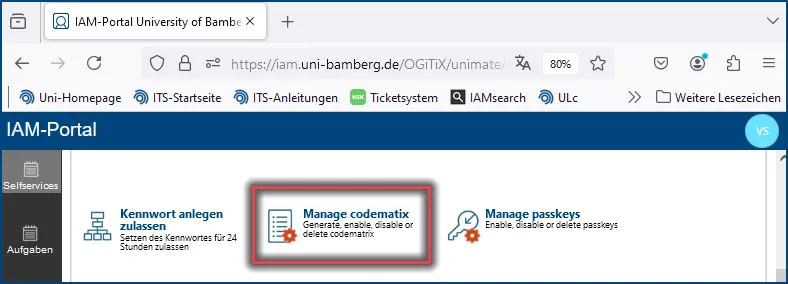
Screenshot 1: Manage Codematrix menu
The first step is to go to the IAM portal (iam.uni-bamberg.de) - Self-services with login - with the use of BA number and corresponding password - can be found in the Manage Codematrix menu.
Codematrix generate
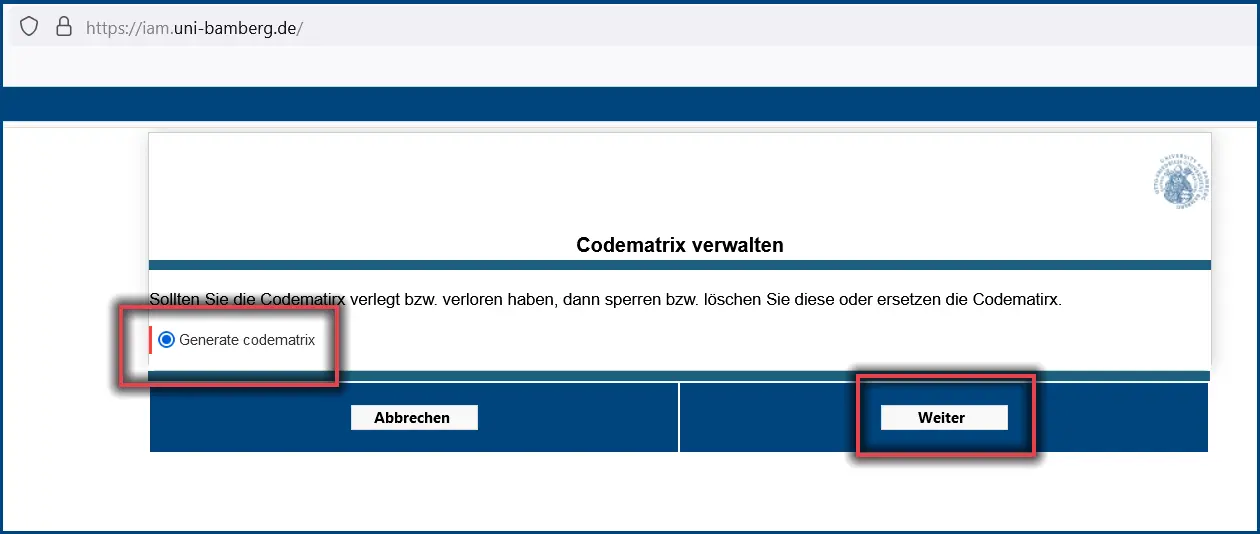
The first step in the Manage Codematrix menu should only be for Generate selection Codematrix. At this point, click Menu and then Next.
Screenshot 2: Generate codematrix
You can now download the codematrix as a PDF file. If possible, print out the code matrix directly. Keep the code matrix in a safe place and do not pass it on to third parties! Then confirm the code matrix setting with OK.
Figure 3: Download codematrix in the IAM-Portal
Attention!
After downloading the code matrix, print it out at the earliest opportunity and delete it from your computer (smartphone, tablet). The code matrix must not be saved locally on the computer or another mobile device as a PDF, PNG or similar!
Set up passkey
If you want to set up Passkey on all end devices, please stay logged in to the IAM portal and follow our instructions on the website Passkey (MFA solution for web applications).
Replace Codematrix
If you do not have access to your codematrix, select Replace codematrix from the menu and confirm with Continue. Now go back to the Create codematrix instruction point and follow these steps again.
The old codematrix will be automatically locked!
Figure 4: Replacing the codematrix
Unsuccessful cases
Please repeat the steps if you receive the notification: The new Codematrix was not rolled out successfully and has therefore been deleted.